In my last post I turned Claude Code into the SOC application: a VS Code workspace full of agents, skills, MCP servers and enrichment data, with the editor as the operations surface. It works really well, with one big catch. It works for me. The whole thing lives on one workstation, inside one person's IDE, under one person's login.
The moment a second analyst wants to use it, you have a problem. They need their own copy of the repo, their own MCP credentials, their own Claude login, and no one has any idea what anyone else asked the agent to do. That's fine for a prototype and a non-starter for a SOC.
So I took the same project and wrapped it in a multi-user web application. I'm calling the shell pyAgent. It's built on the claude-agent-sdk, and this post walks through the parts I care most about: LDAP authentication with role-based access control driven by Active Directory groups, what each role is allowed to do, the plan-usage bars, live Markdown/PDF preview, session management, skills, permission configuration and logging.
A fair warning before the rest of this. pyAgent is not an enterprise-grade product. It's a working internal tool that I built quickly to solve a real problem, and parts of it are still a bit of a hack job. It has had the security testing I describe below, but it hasn't had an independent review. Treat this post as a write-up of what I built and what I learned, not a recommendation to deploy it as is.
What it is
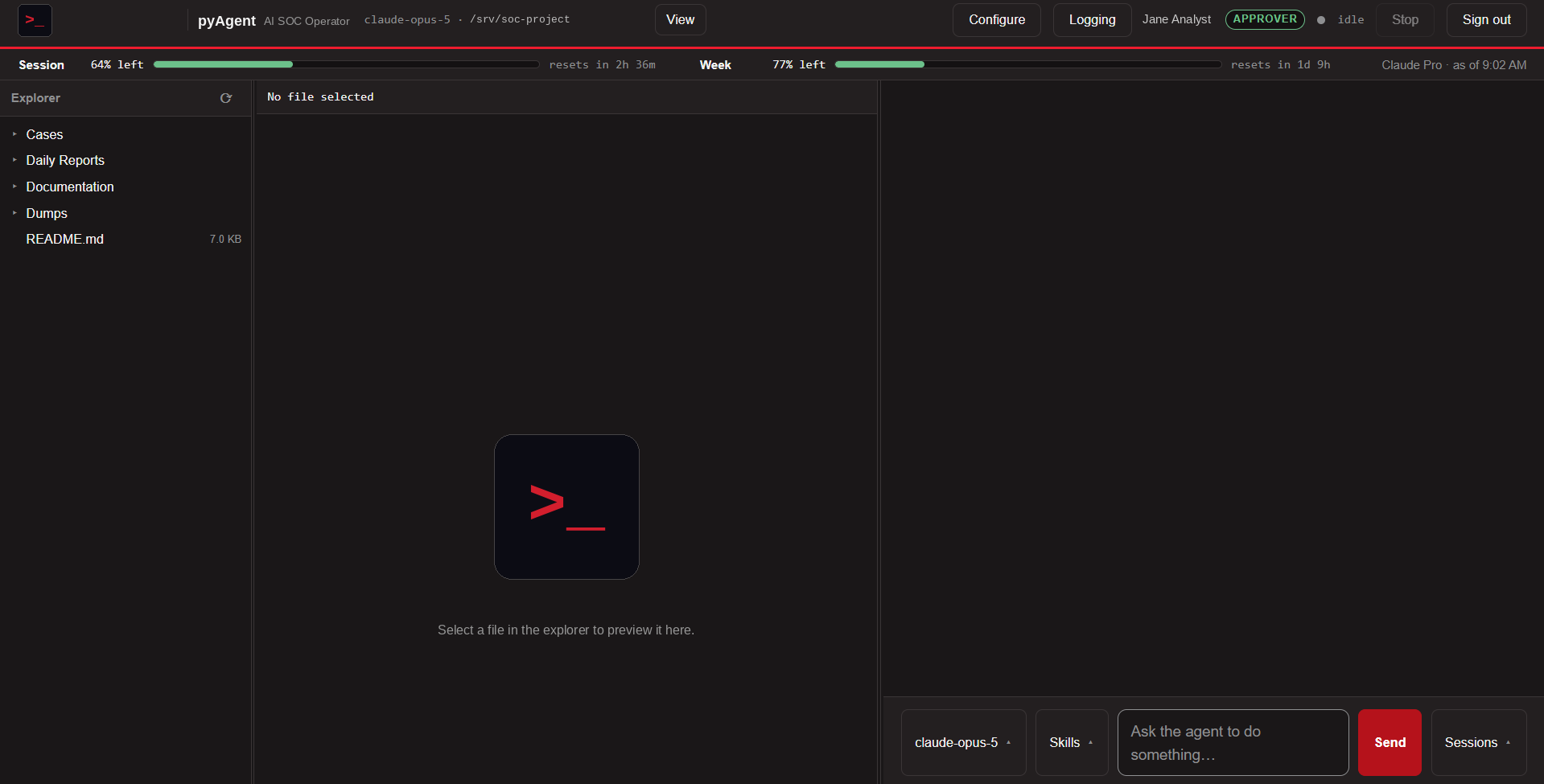
pyAgent is a small FastAPI application that sits in front of the Claude Agent SDK. You point it at a project folder and it becomes a shared web interface where an authenticated team talks to an agent that can act on that project, under a permission policy that I control in Python. Each analyst gets a private conversation. The project's files and the agent's memory are shared.
browser  ──POST /api/message──▶  FastAPI  ──▶  AgentSession
   ▲                                              │
   └────────SSE /api/events──────────────────┐    │ ClaudeSDKClient
                                             │    ▼
   ┌──POST /api/approve──▶ asyncio.Future ◀───┴── claude CLI subprocess ──▶ Claude
Each conversation owns a claude CLI subprocess. The browser sends messages in over POST and gets the agent's output back as a server-sent event stream. When the agent wants to do something privileged, its loop parks on an asyncio.Future and a card shows up in the browser. Nothing moves until a human with the right role clicks Approve or Deny.
The other design decision worth calling out is that the shell never gets edited for a project. It's a clean git checkout at a release tag. Everything project-specific (config, secrets, certs, the audit log, custom tools) lives in a small .pyagent/ overlay folder inside the project. Upgrading a deployment is a checkout of a newer tag, and the upgrade script validates the new version against the overlay and rolls itself back if anything fails.
LDAP authentication against Active Directory
Analysts sign in with their domain account. There's no separate user database and no passwords stored anywhere in the app.
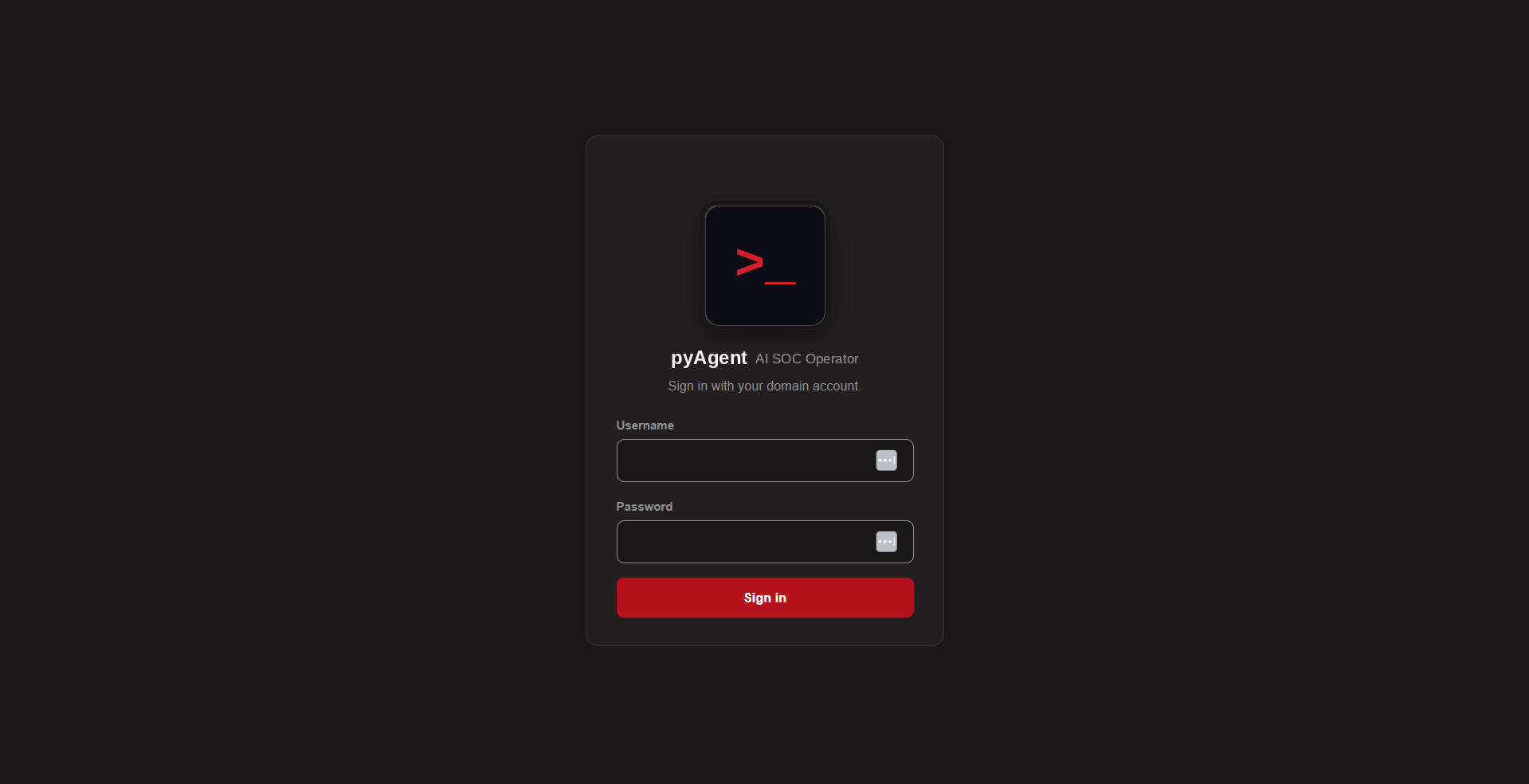
A login runs through these steps, in this order:
- Rate limit first. Per username and per IP, and before any bind. If you don't do this, walking a user list with bad passwords trips the domain's lockout policy on every account, and you've built a company-wide denial-of-service tool. The per-user limit has to sit comfortably under your AD lockout threshold.
- Reject empty passwords outright. Per the LDAP spec, a simple bind with a username and an empty password is an unauthenticated bind, and AD answers it with success.
- LDAPS or StartTLS, with certificate validation. The app refuses to start on plaintext LDAP, because a simple bind puts the password on the wire in the clear.
- Search as a read-only service account, then rebind as the user. The username goes through
escape_filter_charsbefore it touches a search filter. - Resolve groups, including nested ones. More on that below.
- Create a server-side session. A 32-byte random token in a
HttpOnly; Secure; SameSite=Strictcookie, and the cookie carries nothing else.
Every failure returns the same generic message to the browser. The real reason (AD hands back codes like 52e for bad credentials, 775 for locked out, 533 for disabled) is decoded and written to the audit log only, so the login endpoint can't be used to enumerate accounts.
Nested groups
This one bit me early. The memberOf attribute only reports direct membership. If an analyst is in SOC-Analysts and that group is itself a member of the approvers group, memberOf misses it and the analyst silently loses a role. The fix is AD's LDAP_MATCHING_RULE_IN_CHAIN, which walks the whole chain server-side.
Roles, mapped from AD groups
Authentication tells me who someone is. Authorization is where the AD groups come in. Three roles, each mapped from a group named in the overlay's .env:
| Role | Mapped from | May |
|---|---|---|
viewer | GROUP_VIEWER | Browse and preview files, read their own conversations |
user | GROUP_USER | Send messages, run skills, switch models |
approver | GROUP_APPROVER | Authorize privileged tool calls, and change the agent's configuration |
Two details of the mapping are deliberate. An empty GROUP_USER means "any authenticated account may chat," since AD membership is already the gate for a team tool. But an empty GROUP_APPROVER is never treated that way. It means nobody can approve. Defaulting that setting open would hand every user the power to authorize privileged commands, and the failure mode of "nobody can approve" is a lot more recoverable than the alternative.
An account that's in none of the mapped groups can't sign in at all. That also makes shared links inert if they get forwarded outside the team (more on those below).
When a non-approver triggers something that needs approval, they're refused with an explanation instead of being shown a prompt they can't answer.
What each control closes
Because this is multi-user, identity gets enforced at every entry point, not just the login page:
| Control | What it stops |
|---|---|
| Server-generated conversation IDs + ownership check | Reading or driving another user's conversation |
| Identity from the cookie only, never a request field | Impersonation by editing a JSON body |
| 404 instead of 403 for someone else's ID | Confirming that an ID exists |
SameSite=Strict + CSRF token + Origin check | Cross-site state changes |
| Strict CSP, no inline JS or CSS | XSS through the untrusted text the agent renders |
| Per-user and global conversation caps | Subprocess exhaustion, since each conversation holds a claude process |
Permissions: four layers, and one trap
The SDK evaluates every tool call in a fixed order: hooks, deny rules, ask rules, permission mode, allow rules, and finally the can_use_tool callback. Understanding that order is most of understanding harness design. pyAgent uses four layers on purpose:
- Hard deny. A
PreToolUsehook that runs first and holds even inbypassPermissions.sudo,rm -rf, pipe-to-shell, and credential files are refused categorically and nobody is ever asked. - Narrow allowlist. Only the project's custom tools, which are read-only by construction, are pre-approved.
- Runtime classifier. Every
Bashcall reaches Python. A single command whose executable is on the read-only list runs immediately. Anything with shell metacharacters doesn't. - Human approval. Whatever is left parks on that
asyncio.Futureand goes to an approver.
The trap: a tool approved by an earlier step never reaches can_use_tool. If you put "Bash" in allowed_tools, your approval prompt silently stops firing, because the call is approved at the allow-rules step. That's why the allowlist here contains only the custom tools and Bash deliberately falls all the way through to Python.
Configuring it without editing code
Approvers get a Configure button. Turning on a newly added skill, allowing an enrichment domain or blocking a tool used to mean editing extension.py and .claude/settings.json by hand and keeping them in step. Now it's a panel.
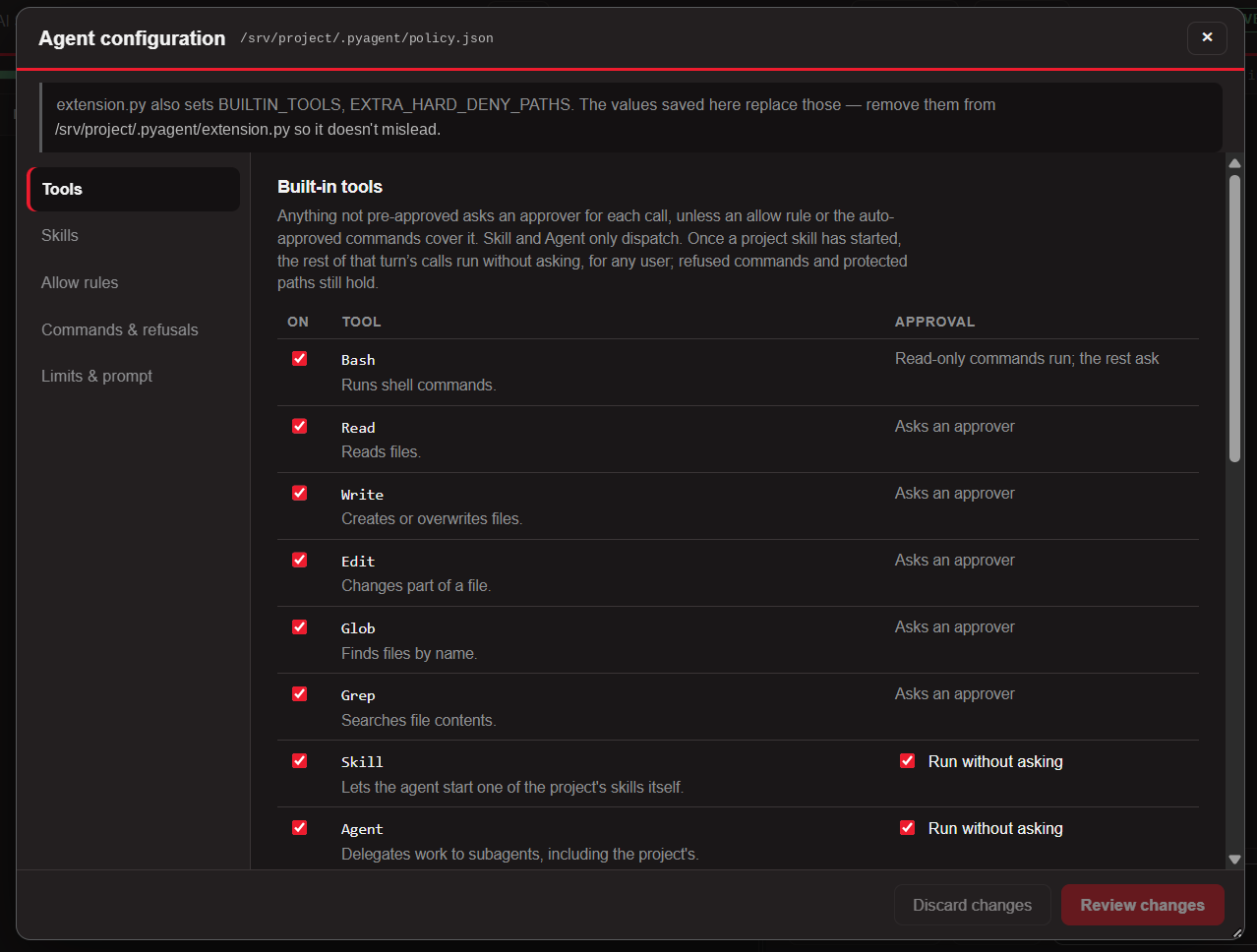
| Tab | Changes |
|---|---|
| Tools | Built-in tools on or off; whether Skill, Agent and the project's own tools run without asking; any other tool (an MCP tool, say) blocked outright |
| Skills | Which Claude Code settings the agent loads, and each project skill on or off |
| Allow rules | The project's .claude/settings.json allow rules. Adding one here acknowledges it |
| Commands & refusals | Extra auto-approved commands, refused patterns and protected paths. Built-ins are listed but can't be removed |
| Limits & prompt | Subagent depth and concurrency, the spend cap, and the text appended to the system prompt |
A few rules keep the panel from becoming a hole in the model it configures:
- Approvers only. The button is hidden from everyone else, and every route behind it re-checks the role plus CSRF. The panel decides what runs without approval, so it takes at least the authority to approve.
- Review, then save. Review changes lists what saving would do and flags every change that lets something run with less oversight. Nothing is written until you confirm.
- It can only tighten the floor, never lower it. Saving runs the same startup validation: only
Skill,Agentand the project's own tools can be pre-approved, never Bash or a file writer, and the built-in refusals stay. - The agent can't touch it.
policy.jsonis on the hard-deny list. If someone hand-edits it into something invalid, new conversations are refused while refusals keep following the last valid policy. - Mostly no restart. Refusals, auto-approved commands and disabled skills apply instantly, even in open conversations.
The allow-rule trap
If you let the agent load a project's Claude Code settings (so it picks up skills, subagents, .mcp.json and CLAUDE.md), you also inherit every permissions.allow rule in the project's .claude/settings.json. Those rules skip the approval gate entirely. They were written for interactive use, where a person was watching, and in a shared deployment they become a silent bypass.
So pyAgent refuses to start until every inherited allow rule has been either moved out or explicitly acknowledged. It checks on every start and again whenever a conversation starts, so a rule added to the project later stops new conversations until someone decides about it.
Usage bars
If you've used Claude Code's /usage screen, the strip under the top bar will look familiar: a Session bar (the five-hour window) and a Week bar, each with how much is left and when it resets. Bars turn amber at 25% left and red at 10%.
That matters more in a shared deployment than it did on my own machine. The plan belongs to the service account, so every analyst is spending from the same pool, and nobody wants to find out mid-investigation that someone else's long session ate the week.
Two sources feed it:
- Polling the usage endpoint behind
/usagewith the service account's OAuth token. That gives live figures, but the endpoint is undocumented, so if it changes, polling fails quietly and the gauge falls back to the second source. - The CLI's
RateLimitEvents, which are documented but sparse. A long conversation can run many turns without one.
The token handling is deliberately narrow. It's read fresh for each poll and used for that one request. It's never logged, never sent to the browser, and never refreshed by the shell (the CLI renews it, and refreshing it from here would rotate the CLI's login). Redirects are refused so a redirect can't forward it to another host, and the credentials file is on the agent's hard-deny list. Only the usage windows reach the browser, never the billing detail the endpoint also returns.
Live preview for Markdown and PDF
Reports are the product of a SOC investigation, and they're mostly Markdown, PDF and Word. The middle panel previews them as rendered documents, so an analyst can ask the agent to write a case summary and read it right next to the chat without downloading anything.
| Type | Shown as | How it stays inert |
|---|---|---|
.md | Formatted, with a Rendered / Source toggle | Sanitized against an allowlist (nh3): no scripts, event handlers, forms or iframes; links only to http(s), mailto or other project files |
.pdf | The browser's own PDF viewer | Only files whose first bytes really are %PDF-, always served as application/pdf with nosniff |
.docx | The same viewer, after LibreOffice converts it | Converted from a temporary copy with a fresh profile (macro security on), a 60-second limit, one conversion at a time, cached per file version |
.xlsx | A table per sheet | Cell values only, never formulas; defusedxml for parsing; hard caps on size |
Everything the agent writes ends up in a file the user is about to open, so rendering is where untrusted agent output meets the browser. Hence the sanitizing and the strict CSP. A file whose first bytes don't match its extension is shown as text or binary, never rendered as what its name claims.
The explorer is the dangerous part
The file tree is the shell's only path from an HTTP request to the filesystem, in a project whose root holds the LDAP service-account password, the TLS private key and the audit log. So it's deny-by-default in four layers. A hard-coded NEVER_SERVE list (.env*, *.key, *.pem, .git/, id_rsa*, audit logs) can't be configured away, and naming one as a root fails startup. Then explicit allowed roots, an exclusion list and size and type limits.
Every request goes through one function that rejects .. and absolute paths before touching the disk, resolves symlinks, and re-checks containment against the resolved path. That stops a symlink planted inside an allowed root from pointing at .env. A missing file and a forbidden file both return 404, so the API can't be used to probe what exists.
There's also a Share link button in the preview header. A share link is just the app's URL with a file path on it. It carries no token and no share record, so it has no authority of its own. An anonymous visitor is bounced to sign in, an account in no mapped group can't get in at all, and the file is then fetched under the reader's own identity and role. Forward one outside the team and it's inert.
Session management
An investigation doesn't fit in one sitting. The Sessions menu lists your past conversations, newest first, and from it you can:
- Read one, read-only, with no agent process started.
- Continue one. The agent resumes from its own record of the conversation, so it still remembers what was said. It runs under the policy as it is now, not as it was.
- Delete one, which removes both the transcript here and the agent's own record.
- Start a New session, which closes the open one but keeps it in the list.
Each conversation is written to disk as two files named by a server-generated ID: a .jsonl of the events the browser rendered (a past conversation is shown by replaying the same stream it showed live), and a small .json holding the owner, title and the CLI's session IDs. Ownership is written by the server at creation and is the only thing a lookup trusts. Ask for an ID that isn't yours and you get a 404, exactly as with a live conversation. Approvers can't see other people's sessions either. The IDs are validated against a strict pattern before any path gets built, so a request can't name a file outside the sessions directory.
That directory holds prompts and tool output, so it's hard-denied to the agent and excluded from the project's git.
Skills
The skills from the original project carry straight over. When the agent loads the project's Claude Code configuration, a Skills button appears next to the message box listing the project's skills, each with its description and expected arguments. Picking one drops /skill-name into the box, and anything you'd already typed is kept after it.
Only the project's own skills are listed: those in .claude/skills/ that the CLI reports as actually loaded. Bundled skills and built-ins like /clear are left out. Running a skill is just a normal message (the same text typed by hand does the same thing) so it needs the user role and is audited like any other prompt.
What a running skill is allowed to do
This was the hardest design decision in the project. Most of my skills fork into a subagent, and a skill that forks into a subagent never reaches the approval callback, because the CLI can't ask from inside one. I had two choices: let skills run unattended, or make them useless for anyone who isn't an approver.
I went with a bounded grant. Once a project skill starts, the rest of that turn's tool calls run without asking. The grant is made in the PreToolUse hook, after the refusals and before any prompt, and it ends the moment the agent finishes replying.
- Still refused, and not approvable:
rm -rf,sudo, pipe-to-shell, protected paths (the.env, TLS key, audit log, policy, sessions) and any tool turned off in Configure. A skill can't loosen any of that. - Only the project's own, enabled skills. A bundled or plugin skill gets no such trust.
- Audited. A
skill.startedrecord, then every call astool.approvedwith the reasonwithin skill /name. - Bounded by the turn limit and spend cap.
The honest caveat is that you're trusting the skill. A skill's steps are written by the project, but the model carries them out on the user's arguments and on whatever the skill reads or fetches. Anyone who may run a skill can cause, through it, anything the skill's tools can do that isn't refused above. So give every skill the narrowest tools it needs, and turn off the ones you wouldn't run unattended. There's an escape hatch (SKILL_RUNS_UNATTENDED=0) that restores per-call approval, if the trade-off isn't right for a given environment.
Logging
For a security team's tool, the audit trail is a feature, not an afterthought. Everything lands in a single audit.jsonl, mode 0600, one JSON object per line, written synchronously and flushed per record. Audit events are human-paced, and losing one to a buffer on crash defeats the point. Secret-shaped fields (password, token, cookie and friends) are redacted before anything is written, and values are size-bounded.
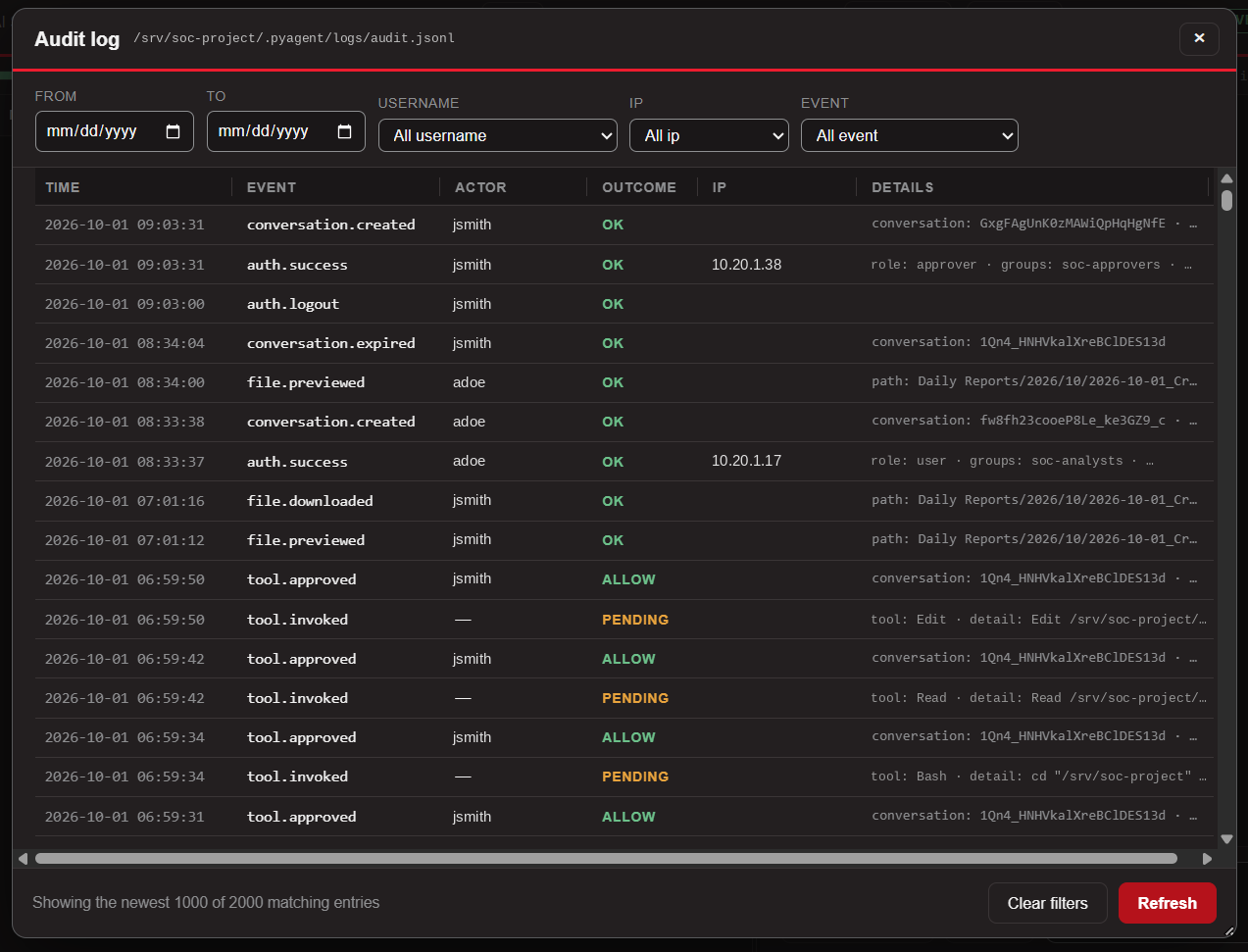
What gets recorded: sign-ins and failures (with the decoded AD reason), conversations created, resumed and deleted, prompts submitted, skills started, every file previewed or downloaded, model switches, configuration changes, and every tool the agent asked to run along with who approved or denied it. A short slice of the approval flow looks like this:
tool.requested  actor=alice  outcome=pending       Write .../AUTHTEST.txt
tool.approved   actor=alice  outcome=allow         Write .../AUTHTEST.txt
tool.requested  actor=bob    outcome=pending       Write .../AUTHTEST.txt
tool.denied     actor=bob    outcome=no_authority  Write .../AUTHTEST.txt
That's the whole accountability story in four lines: the same write was requested twice, an approver allowed it, and a plain user was refused. The agent itself can't read or modify the log.
Verifying it
A stub mode swaps AD for a fake local directory with a few test accounts, so the whole flow, including the security tests, runs without a domain controller. The test pass covers unauthenticated access to every route, the empty-password bypass, LDAP injection, cross-user IDOR, approval authorization, CSRF, security headers and rate limiting.
That testing paid for itself. One scripted login beat the page's JavaScript to the draw and submitted the form natively, which put the credentials into the URL as a GET query string, and I watched GET /login?username=…&password=… scroll past in the access log. The fix is three independent guards: the submit button ships disabled until the handler is attached, the inputs have no name attribute so a native submit would carry nothing, and the form is method="post" regardless. Then I re-verified with JavaScript disabled and a canary password to confirm it never appeared in the log.
Where this goes next
The goal was to keep everything that made the single-user version useful (the agents, the skills, the MCP wiring, the enrichment data) and make it safe to hand to the rest of the team. The design leans the same direction as the first post: least privilege, nothing shared implicitly, and every action attributable to a person. It's still a hack job in places, and the move to a managed platform is partly about growing it into something that deserves to be called production.
The next step is bigger than a feature: this is moving off a single Claude plan and onto a managed model platform, either AWS Bedrock or Microsoft Foundry, depending on which fits the environment better. pyAgent was built on the service account's own Claude login because that was the fastest way to get a team using it, and it shows in a few places. The whole team spends from one plan, the usage bars lean on an undocumented endpoint, and the model access sits outside the controls the rest of the company already uses.
Moving to a platform addresses those directly:
- Identity and access. Model access becomes an IAM role (Bedrock) or an Entra ID identity (Foundry) instead of a CLI login that lives in one service account's home directory. That's one less long-lived credential on the box, and access to the model is governed like every other cloud resource.
- Data handling. Prompts and tool output here are investigation data, which is exactly the kind of thing I want to keep inside our own cloud tenant, in a region we choose, under the platform's data-handling terms.
- Quotas and cost. Per-request billing and platform quotas replace the shared plan windows. The Session and Week bars as they exist today will change, since they were built around plan limits, and what replaces them is likely usage and spend against a budget.
- Network and logging. Private connectivity to the model endpoint, plus the platform's own request logging, sits underneath pyAgent's audit log. pyAgent still records who asked and who approved, and the platform records what was sent to the model.
Either way, the web app itself moves into a container. Today pyAgent runs as a systemd service on a single server with an overlay folder beside the project, and that layout doesn't carry over unchanged. A few things get reworked:
- Configuration and secrets. The overlay's
.env(LDAP service account password and all) gives way to the platform's secret store and environment, so nothing sensitive is baked into the image or sits on a disk. - State. Sessions, the preview cache and the audit log currently live on local disk. In a container that needs either persistent storage or, for the audit log in particular, shipping the records out to central logging so they outlive the container.
- TLS. pyAgent terminates its own TLS today. Behind a platform load balancer it makes more sense for the platform to do that, which means revisiting the startup checks that currently refuse to run without TLS.
- Dependencies in the image. LibreOffice for the Word previews have to be built into the image, and the image gets pinned to a release tag the same way the shell is pinned today.
The part I'm keeping is everything above the model: the AD sign-in (move to Entra ID), the role mapping, the approval gates, the previews, the sessions and the audit trail. That's the reason for building it as a shell with a project overlay in the first place. The model backend is a configuration concern, not a rewrite. I'll write up the move properly once it's done, including what changed in the usage reporting and anything that behaved differently on the platform.