Over the past few months I've started using Visual Studio Code and Claude Code in a way I didn't originally expect. Instead of having Claude Code help me build an application, I've effectively turned it into the application.
That sounds like a word game until you sit on it for a bit. Normally you point a coding assistant at a repo and it helps write code with you (what I thought to begin with). What I've been doing is different: the assistant, plus a stack of custom context, is the thing that does the work. There's no app to deploy and no server to run — the whole workflow lives inside the IDE. This post is the story of exactly how the pieces are wired together to make a SOC analyst's job easier.
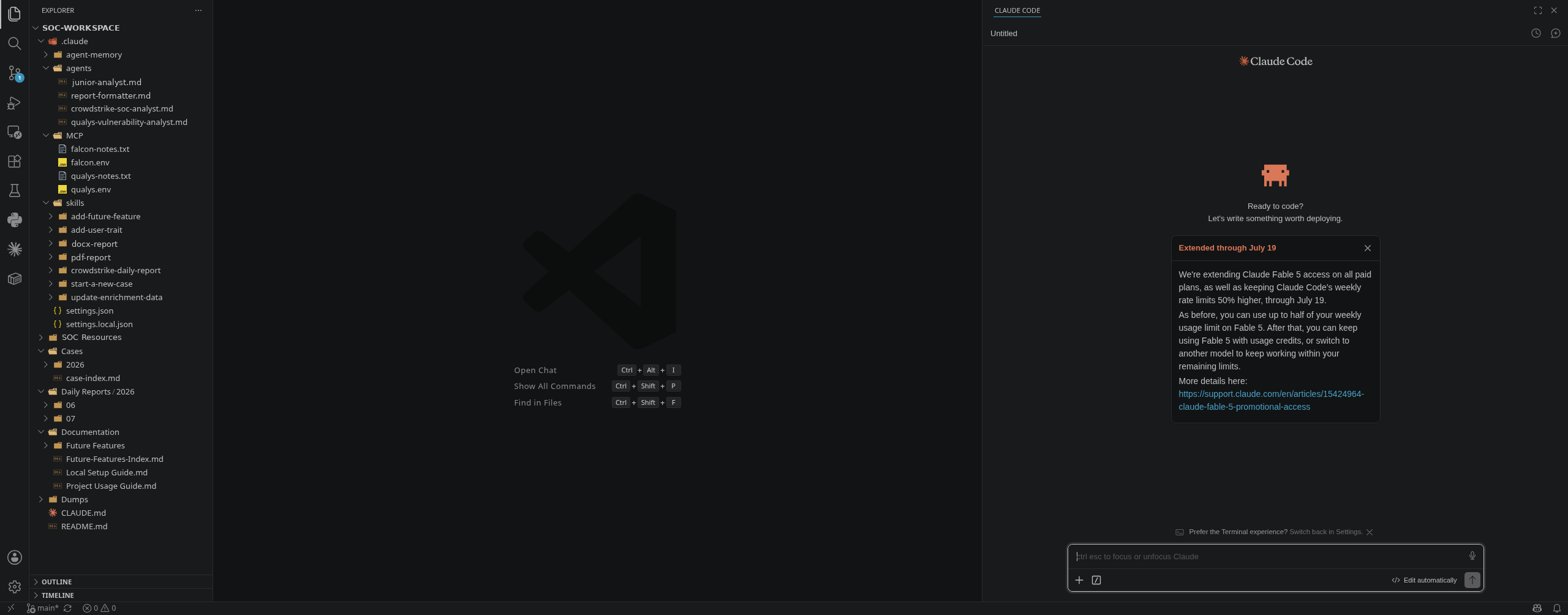
On the left is the workspace: a set of agents, the per-agent MCP configuration that wires them to CrowdStrike Falcon and Qualys, a folder of skills, and the output folders where finished work gets filed. On the right is Claude Code itself, waiting for the next question. There's no dashboard and no separate console — the editor is the operations surface. Everything below is a walk through that tree.
The pieces, and how they fit
Four moving parts do all the work, and the whole design is about keeping them scoped:
- Sub-agents — one per job or product, each with its own tools, its own memory, and a hard role boundary.
- Skills — repeatable procedures that don't run in the main chat; each one is forked directly into a named agent.
- MCP servers — the read-only connections to Falcon and Qualys, defined inside the agent that uses them, running in Docker.
- Shared context — per-agent memory plus a folder of human-curated enrichment data every analyst agent consults.
The theme running through every one of those is least privilege: nothing is global, nothing is shared implicitly, and nothing touches a platform in a way that could change its state.
Sub-agents: one per job
The piece I'd push hardest on if you're building something similar is scoping the agents. Each product gets its own analyst agent and nothing else. Falcon work runs through a CrowdStrike agent; vulnerability and exposure work runs through a Qualys agent. Two more agents handle formatting and low-trust file chores. Every agent carries a distinct color so transcripts stay readable, a defined role boundary, and its own memory folder.
| Agent | Handles | Platform access |
|---|---|---|
crowdstrike-soc-analyst | Falcon detections, alerts, host lookups, process trees, "is this malicious?" | Falcon MCP — read-only |
qualys-vulnerability-analyst | CVE/QID lookups, patch prioritization, exposure and risk analysis | Qualys MCP — read-only |
report-formatter | Turns a finished markdown report into a brand-consistent DOCX/PDF and visually verifies the result | None |
junior-analyst | General file and support chores — deliberately lower-trust | None — no MCP, no shell |
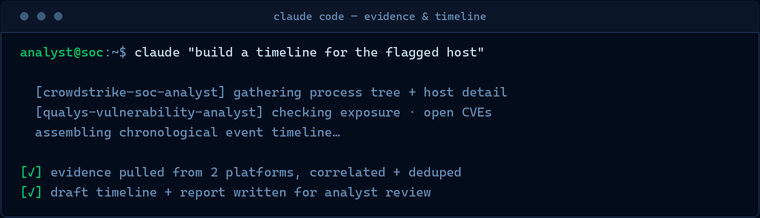
The main thread never does the deep platform digging itself. It acts as a router: understand the request, delegate to the right specialist, then reconcile what comes back. Correlating findings across products — a Falcon detection and a Qualys exposure on the same asset — is treated as its own concern, handled a level up, so I never teach a single-product agent another product's data model.
Skills are linked directly to agents
A skill here is a repeatable procedure — "run the daily report," "open a case," "convert this to a document." The rule I hold to is that a skill never runs inline in the main chat. Every skill declares, in its own frontmatter, that it forks into a specific named agent. So the skill inherits exactly that agent's tools, memory, and role boundary — and the main thread stays a thin router that triggers the skill without ever executing its steps itself.
| Skill | Forks into | Trigger | Output lands in |
|---|---|---|---|
crowdstrike-daily-report | crowdstrike-soc-analyst | "run the daily report" | Daily Reports/YYYY/MM/ |
start-a-new-case | crowdstrike-soc-analyst | "open a case for X" | Cases/YYYY/MM/ + case index |
docx-report | report-formatter | "convert this to Word" | next to the source file |
pdf-report | report-formatter | "export this as PDF" | next to the source file |
update-enrichment-data | junior-analyst | "add this to enrichment data" | Enrichment Data/ |
add-user-trait | junior-analyst | "note that this account is a known VPN user" | user-traits lookup |
add-future-feature | junior-analyst | "add a future feature" | Future Features/ + index |
Pairing each skill with an agent is what keeps tool use, platform access, and memory scoped to one accountable place. The document-formatting skills fork into the formatter (which has no platform access at all); the file-chore skills fork into the low-trust junior agent; anything that touches Falcon forks into the CrowdStrike agent. Nothing gets to quietly borrow another agent's privileges.
MCP servers live inside the agent, not the global config
This is the detail I'm most opinionated about. The Falcon and Qualys connections are MCP servers running in Docker containers, and their configuration is defined in the individual agent's own config file — the CrowdStrike agent carries the Falcon server block, the Qualys agent carries the Qualys server block. There is no project-level MCP config and no reliance on a personal global one.
That matters for two reasons. First, tool access stays explicit and auditable: when I want to know what the Qualys agent can reach, it's declared in one file, not spread across a project config and a personal settings blob. Second, it avoids the failure mode where a shared, synced global config silently grants every agent — and every analyst — access to a platform at once. Each agent gets only the servers it needs, wired to it and nowhere else. The junior-analyst agent, for example, is given no MCP servers and no shell tools at all — it exists to do harmless file chores, and its config reflects exactly that lower trust level.
The other half of that per-agent wiring is when the servers run. They aren't long-lived background services sitting around waiting — each MCP server is spun up on demand, in a Docker container on the local machine, only when the agent that owns it actually needs it, and torn down again as soon as the task is finished. Nothing lingers between requests. A daily-report run brings up the Falcon container, does its work, and the container is gone by the time I'm reading the summary.
For me that turned out to be a bigger deal than I expected. The system this runs on has fairly minimal resources, and if these connectors were permanent containers eating RAM around the clock it would be a real problem. Because they only exist for the life of a task, the idle footprint is essentially nothing — the containers are only consuming resources during the few seconds an agent is actually querying a platform. On-demand, single-agent, and read-only end up reinforcing each other: the connection exists for exactly as long as one scoped, read-only task needs it, and not a moment longer.
Read-only, at all times
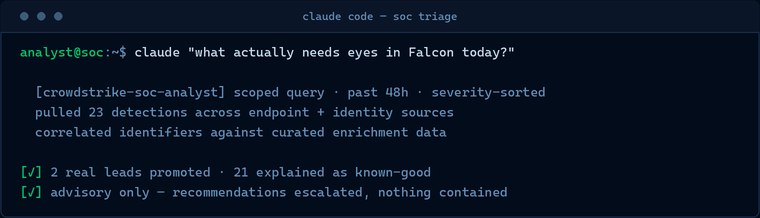
Here's the constraint that makes me comfortable pointing any of this at production security platforms: every platform connection is strictly read-only, always. The agents query, correlate, triage, and recommend. Not one of them contains a host, kills a process, quarantines a file, changes a detection's status, edits an asset tag, or launches a scan. There is no code path in this workspace that takes a state-changing action on Falcon or Qualys, by design.
It's enforced in two layers rather than one. The agents' role boundaries say read-only and advisory in plain language — but more importantly, the agents simply aren't wired with the tools to do anything else. Anything that needs a real action gets escalated to a human with the right privileges, handed a clear recommendation and a stated confidence level. The system's job is to get an analyst to a decision faster, never to make the decision or pull the trigger for them.
Where the work gets filed
Output isn't left floating in a chat transcript — every skill writes to a specific place on disk, and the folders themselves are part of the design. Three of them do most of the day-to-day work:
Daily Reports/YYYY/MM/— recurring, severity-sorted Falcon summaries for a time window, filed by report date. This is what thecrowdstrike-daily-reportskill produces: ask for the daily report and it forks into the CrowdStrike agent, runs a scoped query, and drops a dated markdown summary into the right month folder.Dumps/YYYY/MM/— the space for random output. Ad-hoc reports, evidence exports, raw log pulls, one-off handoffs — anything that doesn't belong to a formal case but needs to live somewhere. Files land under the month matching their creation date, and every write here is paired with an agent-memory update so a future investigation can still correlate against it.Cases/YYYY/MM/— output from a human-led investigation, filed under the month the case was opened so one investigation's files stay together. Every file is prefixed with a case number, and rather than let me hand-pick one, thestart-a-new-caseskill allocates the next number, creates the folder, and logs it.
The index files
A couple of folders carry a companion index file so I can see everything at a glance: case-index.md gives every case a stable, year-qualified identifier, and there's a matching index that tracks planned features. The important habit is that these indexes are treated as a convenience, not a source of truth. The start-a-new-case skill, for instance, confirms case numbers against the actual folder contents rather than trusting the index alone — so if the two ever disagree, the real files win. That keeps the system honest even when an index gets out of sync.
Future Features
Not everything is built yet obviously, so planned work gets a home too. Each not-yet-implemented integration or runbook is a "card" under Future Features/, following a shared template with a status line — Waiting or Completed — near the top, and all of them roll up into a single index. Creating one is itself a skill: add-future-feature forks into the low-trust junior-analyst, writes the card from a description, and updates the index in the same pass. It's the same pattern as start-a-new-case — a structured document and its index entry always created together, never by hand.
Enrichment data: shared ground truth
The analyst agents each keep their own private memory, but some knowledge needs to be shared across all of them — and it needs to be human-curated fact, not something an agent inferred. That lives in a dedicated Enrichment Data/ folder: structured lookup files that every read-only analyst agent is explicitly pointed at whenever it's correlating an identifier during an investigation.
Two examples make it concrete. One file maps the organization's known public IP addresses to the resources that own them, so an address the platform APIs can't resolve gets recognized as company-owned instead of reported as an unknown external host. Another records per-user context — for instance, that a given account is a known (consumer) VPN user — so expected behavior isn't mistaken for an anomaly. A hit in one of these files tells the agent "this is known, lower the confidence on true positve".
The wiring around it is deliberate. The folder is human-curated ground truth, replaced in place rather than versioned into dated snapshots, and kept distinct from any agent's private memory. It's maintained through skills — update-enrichment-data for whole files and add-user-trait for a single row — and those skills don't just edit the folder; they also verify that every analyst agent is still wired to consult it. Adding a new analyst agent without pointing it at this data is treated as a bug, not an oversight.
Memory that doesn't reset
The last piece that took this from "neat demo" to "I use it every day" is per-agent memory. Each agent keeps its own project-scoped notes — environment quirks, known false positives, gaps in what an API will and won't return — under its own memory folder. So institutional knowledge accumulates across conversations instead of resetting every session. The agent that learned last week a particular pattern is benign doesn't make me re-explain it this week. It's the counterpart to the shared enrichment data: enrichment data is human-authored fact every agent reads, memory is each agent's own learned experience of this specific environment.
Why this makes the job easier
None of the individual pieces are exotic. Sub-agents, skills, MCP servers, containers, a bit of retrieval and a lot of careful context — the parts are all off the shelf. The leverage is entirely in how they're wired: one agent per product, skills forked into those agents, MCP configured and locked read-only inside each agent, tools handed out on a need-to-have basis, shared facts in one curated place, and every output filed where the next investigation can find it. Get that scaffolding right and the analyst spends their time on judgment — is this real, how bad is it, what do we do — while the collection, correlation, sorting, and writing-up happens around them.